
Can't restore my PC and I am in big trouble. Restore process never progress
Ok..
Long story short.
I had a fine running system on a standard hard drive, that I frequently backuped (whole C:) with acronis true image 2011.
A week ago I bought a SSD drive and decided to migrate my system there.
For that I used paragon migrate SSD and it worked fine.
My new system was running on the new C: which was the SSD and the old c: became j:
I decided to optimize the SSD By removing the indexing as advised on a tweaking forum, and the next time I booted, my system was very slow, and some nvidia drivers kept crashing, until I could not boot anymore.
What I did was make the old Hard Drive the primary boot again, and I could boot my system again on the old HD .
I wanted to restore my System to the state it was BEFORE migrating, so I used acronis 2011 restore to restore my system to November 20th..
It started, rebooted and when it was doing the restore, I got warning message saying that certain files could not be restored.
When it rebooted. Of course, I could not boot my windows anymore.
That's when I tried using the recover boot cd created with acronis 2011.
It boots, I can select any of my backups (which are on partitions of the same hard drive, or on a USB hard drive (as I tried both solutions)) and start the restore from there, but as soon as I hit the "proceed" button, my PC freezes, and nothing happends. I tried it at least 3 times, with the same results.
As I could not boot anymore, I reinstalled a fresh install of win7 64, and from there I decided to purchase the 2013 version of acronis true image, hoping that it would solve the problem.
I installed it, and I tried to restore from the backup on one of my partitions.. When I hit the proceed button, it started, and rebooted, loaded the acronis boot thing, and started recovering, but, nothing happens. It says the restore process is started, and though the mouse isn't froze and I can access the help part, the progress bar isn't moving at all, and the hard drive light isn't acting, neither the hard drive making any noise..
Why is this happening to me ? I always thought I was safe with these acronis images I created every week, but now I cannot even restore my system.
Can somebody help me out, and explain me why my restore process isn't moving on ?
I thank you for your help. It will be much appreciated.

- Log in to post comments

Patrick,
First use the recovery CD to validate your image - once it has validated OK, from the recovery CD (if using the 2013 version) try;
Select Tools and Utilities and choose Add Disk, follow the wizard. This will wipe out anything that Paragon might have altered and bring the SSD back to how it was when you purchased it and make it ready for True Image to recover the image.
Then try to recover your image.
Is this your original drive that is no longer booting or the SSD?
Have you enabled software RAID or AHCI in your BIOS between making the image and trying to recover it?
- Log in to post comments
Colin.
As for now, I'm not even trying to use my SSD. I just wanted to get my computer back as it was when I decided to purchase the SSD.
I am trying to recover the image I made of the C: partition of my hard drive that I made the day before I went to purchase the SSD, and altering anything on my computer.
Yes, you are right. First in my BIOS, I was in IDE mode, and in order to have the SSD recognized , I switched it to AHCI.
Now that the SSD is removed, I switched back to IDE before trying to recover, but you might be into something, because it is true that I can't see the hard drive into the Sata list, as it was before.
It is strange, because the hard drive is there and recognized both by windows when I reinstall it, and in the boot menu sequence of the Bios when windows is installed.
I can try what you suggested though, because I also have an image of the C: when windows was already installed/migrated on the SSD, and everything was working fine.
Thank you for your help, it is much appreciated !
- Log in to post comments
I found this in the FAQ:
--
6. Windows 7 restore specifics.
In order to restore an image of Windows 7, make sure that the 100 mb System Reserved partition is backed up and then included in the restore. Please note, that it is not always present, depending on how Windows 7 was installed.
--
The only back up I made were full backups of my C: drive. I didn't have such a partition in my system. Could that be the problem ? That my backups are unusable ? I made sure to validate them, and they appear to be good.
- Log in to post comments

Patrick Bravin wrote:The only back up I made were full backups of my C: drive. I didn't have such a partition in my system. Could that be the problem ?
It's only a problem if you do have that partition but didnt include it in the backup. IMO, it's always best to do a full disk backup, selecting the entire disk rather than just what you think is the partition you need. A full disk backup is the simplest, safest way to restore.
System Reserved partition would be a hidden partition. To see your drive layout, go into Windows Disk Management which will show all partitions.
- Log in to post comments
It was only a partition C: backup... I had more then 500gb of datas on the other partitions of the same disk and a full disk backup was a bit too much. If only I had know though.. But I remember going into the disk management, and never saw such another partition. I doubt it was ever there.
Update :
I tried restoring my SSD drive with the backup I made as soon as the migration was done and working.
This time, everything seemed to work fine.. The restoration process went ahead, and was nearly completed, when I got this error message, and then plenty of other similar message.. I tried "try again" (reessayer) but it never worked, so I had to ignore all the error message. At the end, I got a "restore process succeeded" message, but when I start booting it say that my system is missing a boot....
Here is a picture of the error message... It says it cannot read certain part of the disk... What the h is going on here ?
http://i1207.photobucket.com/albums/bb470/Shungito/C95D112C-DA3C-4DB2-B…
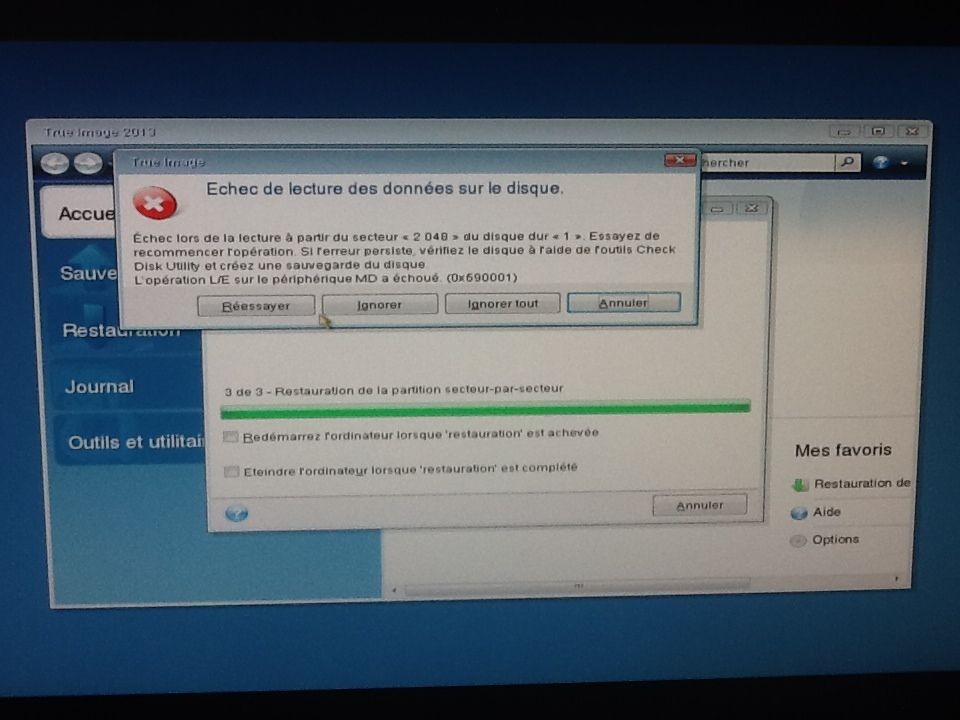
Also, I made sure to validate all my backups, and they all seem to be good to go.
I really NEED your help :(
- Log in to post comments
Excluding the data partition wouldn't cause a non-bootable restore. Excluding a required partition, such as a hidden Active partition, would. Many PCs have a hidden partition, such as System Reserved and/or OEM partitions. Those hidden partitions are often the boot partitions, so when users backup only C: in the mistaken belief that's all they need, a restore of C; only results in a non-bootable system until repairs are performed.
- Log in to post comments
OK, if you only have the 'C' partition and not the complete disk (double check that the hidden system partition isn't in the image, because if it is all you will need to do is make the partition active again), you will need a Windows 7 repair CD in order to try and remake the missing 100 MB system partition.
I'm off to bed now, so I won't be replying to anything until tomorrow at the earliest.
- Log in to post comments
Really, this is driving me crazy.
I tried the same restore again on the SSD, and now Acronis freezes again.
Blah.. I think I'm gonna trash it and reinstall all manually.. :(
EDIT. Had not seen your answer Colin. Well, I guess that is definetely the problem here. I am missing the partition 100mb.
Anyway, I think I can safely reinstall everything manually. It's gonna take me a while, but except a few file I had on my desktop, and a few others inside some programs previously installed on c:, I have everything on a backup networked drive.
Just a question. Will I be able to retrieve said files browsing the backup files somehow ?
Thanks a lot
Ps: apparently this is not an acronis true image problem, but a user problem. I should have known better how to create a usable backup. From now on, I will be backing up the whole disk (SSD) on which I am reinstalling everything
- Log in to post comments
Yes, you can restore files, using any of three methods. You can do a recovery and choose files/folders, to restore just files and folders rather than a disk/partition. Or, once ATI2013 is installed, you could launch a a .tib archive to open it in Windows Explorer and then copy over the files you want. Or, you can mount the archive.
- Log in to post comments
Excellent. So this is what I a gong to do. Plus probably it will be better to have a fresh install over an SSD rather than a migration.
Ill keep you updated with my progress. Thanks to all the people who are helping me out here
- Log in to post comments
Gentlemen. I have another question.
My reinstall is proceeding well, and I will soon make a backup of my system. But as for now I have a question concerning retrieving old files.
So I mounted my last back up image as a drive. And I can now access it as a disk..
But I have a problem, when I try accessing to my user/pat folder, it says I don't have the rights to access this folder.
How can I fix this ? The files I need are on the desktop, so I need to go there to find them.
Thank you
- Log in to post comments

Instead of mounting the backup as a drive, try double-clicking on the backup file to open it in Explorer to see if you have better results.
- Log in to post comments
Blah. Found the answer myself. In the option of the image mounting, you have to set it as "writable"
- Log in to post comments
Glad it is working for you.
FYI
When mounting the backup as a disk in R/W mode, a new incremental file will be created when you dismount the backup file.
- Log in to post comments