
Not creating a full backup after 6 incrementals as I specified
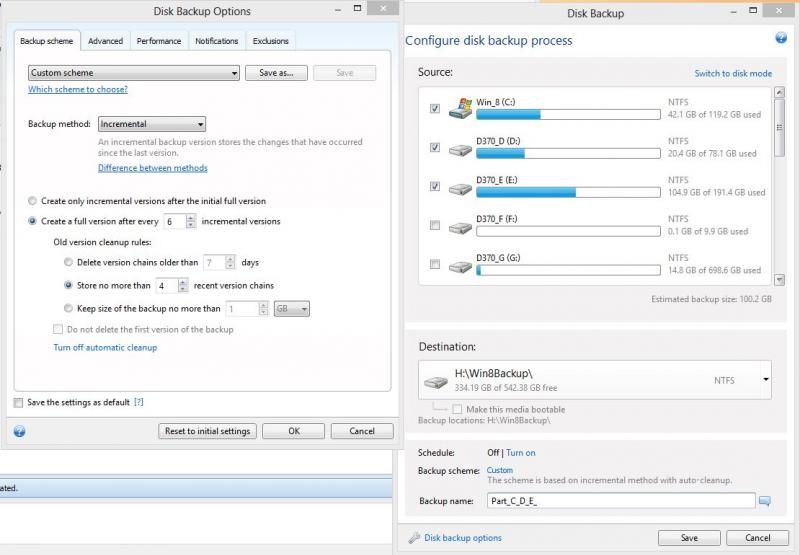
I have my backup type set to incremental and to do a full backup after 6 incremental backups. This is not working, it just keeps doing incrementals.
Any way to fix this? Do I have to go back to using Chain2Gen or something similar?

- Log in to post comments

OS is Windows 8 Pro X64.
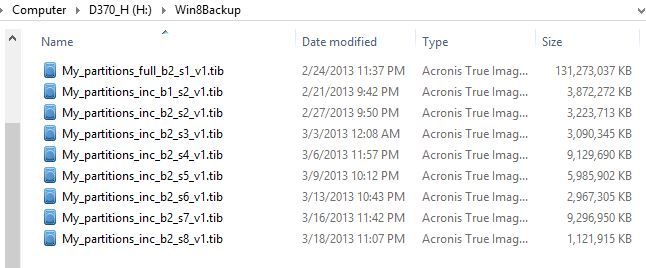
SO far, one full and 8 incrementals. I have it set to do another full after 6 incrementals.
I'll check Grover's info, thanks.
Edit: My setup matches Grover's recommendations exactly.
- Log in to post comments

Any chance you made changes to your task after it was created? Editing a task can cause unexpected resulsts.
The capture shows it on backup chain #b2 and there should also be all 7 files of b1 showing.
Your backup scheme is set for a full backup or new chain after each 7 runs of running backups.
After the 28 backup creation, the (actually the 29th), then the oldest chain (oldest full + oldest 6 inc) will be deleted for a revolving set of 28-29 files. The program will not delete the oldest until a replacemennt has first been created.
If you are want to retain 4 chains ( 1 full +6 inc multiplied x 4), the scheme is set correctly.
However, if it were mine, I would change the selection to disk mode rather than partition mode. Using the disk mode offers easier restore options should a disk replacement be necessary)
Bottom line is startover with a new task pointing toa new empty storage folder. As there is no schedule set, I am assuming that you are running manually from a desktop shortcut or using the windows Task Scheduler to achieve your desired schedule.

- Log in to post comments


From the screenshot, it looks like you have a remnant of the first backup run (done on 2/21).
I suggest you move your existing backup files to a hidden directory for safekeeping, you delete the task in ATI, and recreate from scratch. After the moved files are old enough, simply delete them manually.
Also, avoid changing the backup name, destination, scheme, retention rules. Although the product supports it, it will create confusion and errors when you need the backup. INstead of editing a task, create a new one in a new directory with a new name. In particular, changing the retention settings basically resets the counting to the time of the edit. Finally, retention rules based on age or size can be confusing or might not work in some conditions. For example, limiting to a size that a single chain + one new full exceeds will make the clean up fail.
- Log in to post comments
I saved the existing backups by renaming the folder from Win8Backup to Win8Backup-old then I started the backup task. It created a new full backup.
I don't want to use disk mode as there are two more partiti0ns on that drive that I do not want to backup. All I want is C: (128MB SSD) and the first two partitions on the 1.5 Terabyte drive (D: and E:). I want 1 full and 6 incremental, max of 4 chains.
- Log in to post comments
Usually the other partitons are not large so space is not an issue even on a 128SSD.
If you have partition on the SSD that are not being backed up, be sure and make separte backups and retain.
You could need them all if you need to create another bootable replacment for any reason.
The example shown should get you the 6 and 4 option but be sure and avoid any edits to the backup task.
- Log in to post comments
I did edit the task after the 2nd run (1st incremental) I think, that probably messed it up. I've started over and will see how it goes this time, leaving it at 6 and 4.
My 128GB SSD is a single partition so I'm covered there. I've successfully restored it twice so far recovering from self inflicted wounds.
Thanks you.
- Log in to post comments