
Installation error with Acronis True Image Home 11
Hi there
I'm having serious problems running my recently purchased version of Acronis True Image Home 11. I'm running Windows XP SP3. I have no idea what the build number is of my version but I have my serial number if needed.
When I first installed it, it installed fine and prompted me to reboot. I did so but upon rebooting I was left with a hanging windows start up bar that refused to finish and going along indefinitely. I ended up having to reboot and then use last known good configuration to actually get back into windows.
Now that when I try run Acronis I'm given an error saying
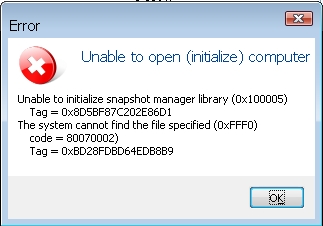
"Unable to open (initalize) computer)"
"Unable to initalize snapshot manager library"
"The system cannot find the file specified". I'll try and attatch the image of the error.

- Log in to post comments

Seems that you have a driveror installation problem.
Is your copy of TI 11 on a CD or did you download it somewhere?
The build can be found by stabbing the ALT button, upon which the 'Help' menu item will appear on the menu bar.
Do you have any registry tracker programs or programs that try to protect system files?
If you open up Hardware Devices does the Acronis network card symbol have a question mark against it?
- Log in to post comments
Thankyou for your response.
It's a downloaded copy (from yesterday) and as I said in my first response, I have no idea what the build number is because that application error image i've posted is what I'm prompted with when I attempt to run the software.
I have no registry tracker program but I do run NOD 32 4.0.
There's nothing like that in hardware devices.
- Log in to post comments
OK, I use ESS so NOD32 shouldn't be the problem.
The fact that you don't have the Acronis driver appearing in Hardware Devices means the install isn't correct.
The reason I asked about what format TI 11 is in, is because it's not a current version and hasn't been for some time (about October/November 2008), and I just wondered if your source might be providing corrupted downloads.
Uninstall the program, clean out registry and see if you can install it in Windows Safe mode, as only basic drivers are installed in this mode then there is little to interfere with an install, of course TI might not be able to install without a full set of drivers running.
- Log in to post comments
It looks like it fails on the installation of the internal snapapi driver module. try to disable anti-virus and all protection software and install one more time. if it fails try to install trial of Home 2009 (it has new updated snapapi module) and see if it works.
- Log in to post comments

Hello Christopher,
Thank you for using Acronis Products
SnapAPI drivers were not installed correctly. I would recommend you install them manually using the following KB article and see if the issue persists.
If the issue persists open a new support case using this link and forward sysinfo with your reply. Do the following:
- Open Start\Programs\Accessories\System Tools\System Information;
- Choose the "Save" option in the "File" menu (or "Action" menu under Windows 2000), enter the "File name" and set the field "Save as type" to "System Information File (*.NFO)";
- Send us the saved file.
- Log in to post comments
I am installing ATIH 2011,,, get flash msg..
Installation Incomplete
Restart installer, try again
can not install products since newer versions are installed..
Manually install ATIH
I would like to install ATIH 2012,,, but for the past 30 days, numerous attempts have failed.
I have attempted to uninstall ATIH 2009, ATIH 2011, a complete uninstall -- failed
As the 30day trial expired, I can neither install or uninstall ATHI 2012...
The ATIH 2009 , ATIH 2011 remains in Control Panel , unable uninstall completely
Run DiskMgmt.msc & DiskPart; get flash msg, "Unable to connect to Vitural Disk Service"
I have used ATIH since 2008, with out any problems,,,until I considered upgrade to ATIH 2012
NOW NONE OF Acronis ATIH work ... can't talk to a person & Customer Support nas not eMailed me in 4 days,
I filed the Customer Service Request July 2, ( 10 days past )
| Attachment | Size |
|---|---|
| 103704-101839.pdf | 186.17 KB |
| 103704-101842.pdf | 186.17 KB |
- Log in to post comments
William,
Which version is showing up in Windows Add/Remove programs, if any?
The registry entries for the virtual disk service would appear to be still in parts of the registry.
If you have a partial install of 2012, then the 2012 install cleaner needs to be downloaded and run, this will delete all information for other Acronis products as well so if you have Disk Director installed for example this also will stop working and need re-installing.
If it appears to be 2010 or 2011 then use the 2011 uninstall cleaner. I can't give you the link at the moment as I'm on a different computer, but a KB search or Grovers Guides have the links.
Are you trying to uninstall via the 2012 installer menu or from Windows Add/Remove programs?
- Log in to post comments